On this page
Table of contents
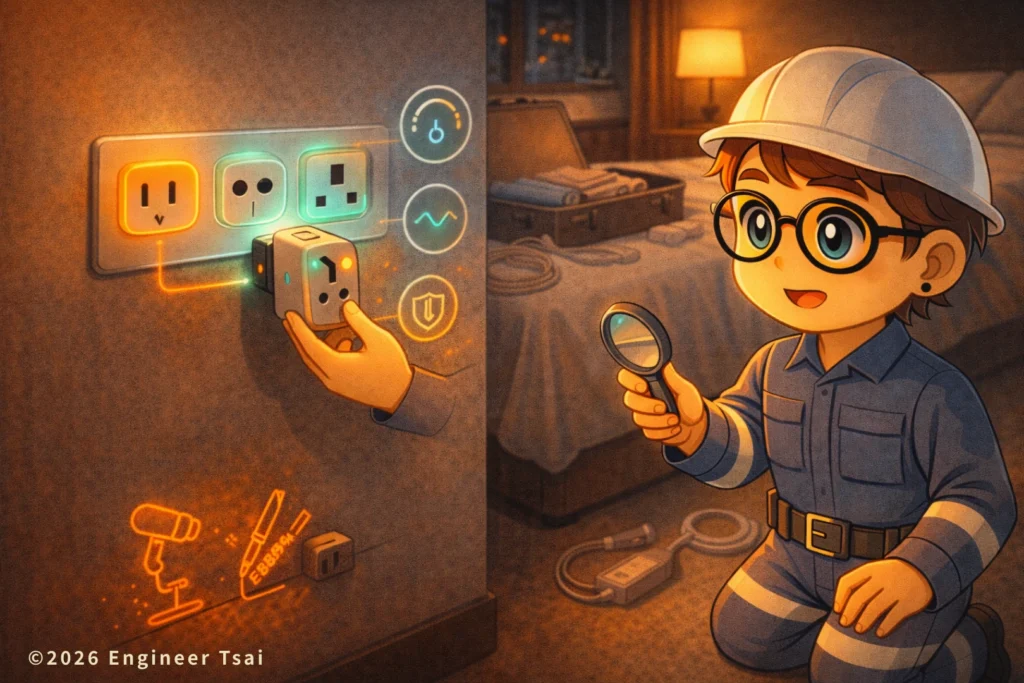
International power outlets look like a simple travel problem: “Just buy a universal adapter.” Then you arrive at the hotel and realize something feels off—your charger runs hot, your hair dryer sounds weird, or the room outlet trips.
Here’s the core idea of international power outlets: plug shape is only Level 1. What you’re really trying to protect is you (safety) and your gear (phone, laptop, camera, hair dryer, shaver, curling iron…).
This guide to international power outlets is written from a real traveler’s point of view: that little bag of adapters in your suitcase, the “looks-like-home” outlet by the bed, and the friend who says, “It’ll be fine—just use it once.” Here’s where things actually go wrong, and how to avoid the common traps.
▶️ Watch first: in 90 seconds, understand short circuit vs overload vs ground fault
Before we talk about outlets and adapters, watch this quick “big picture” breakdown: why breakers trip, what each scenario looks like, and what your safest first move should be—so you don’t make a bad situation worse.
If you want the “voltage / current / watts” intuition first, this helps a lot (Chinese version on my site):
🔹 Electrical Basics: from “What is electricity?” to reading a breaker panel
Chapter 1 — A plug that fits is not automatically safe: the #1 travel trap
The most common (and most expensive) misunderstanding is one sentence: “If it fits, it works—right?”
But in the world of international power outlets, there’s a hard rule:
Mechanical compatibility (it fits) ≠ electrical compatibility (it’s safe).
You’ve probably seen one of these travel moments:
— The hotel outlet looks “close enough,” so you plug in a hair dryer. Halfway through, you smell something odd.
— You bought a “universal” adapter. It plugs in… but your charger stays hot and your cable feels warm, and you can’t relax.
— The outlet is loose. The plug sits half-hanging, the contact is bad, you see a tiny spark—and you’re suddenly wide awake.
What you should check isn’t the “look.” It’s these four things: voltage, frequency, grounding, and outlet quality/tightness. Get the order right, and your risk drops fast.
Chapter 2 — Only 4 things matter: plug shape, voltage, frequency, grounding (in that order)
When dealing with international power outlets, I recommend this exact order:
1) Plug shape (plug type): do you need a travel adapter?
2) Voltage (V): can your device accept it?
3) Frequency (Hz): some appliances care (not all).
4) Grounding (third pin / earth): especially important for metal-bodied or higher-power devices.
Notice the pattern: plug shape is the easiest step—and it’s the only step most people do. The “burnt charger / weird hair dryer / tripped outlet” stories usually happen in steps 2–4.
The best part: you don’t need to memorize country charts. You just need to read one line on your device. Look for something like:
Input: 100–240V ~ 50/60Hz (if you see that, you’re usually in a much safer zone)
Quick translation: if your charger or laptop power brick says “100–240V 50/60Hz,” it’s typically dual-voltage (worldwide compatible). In that case, you often only need a travel adapter. But if it only says “110V” (or only “220–240V”), don’t gamble—pause and verify before you plug it in.
Chapter 3 — Identify common plug types: A/B/C/E/F/G/I (don’t memorize countries)
There are many plug types worldwide, but as a traveler you’ll run into a small handful again and again. Don’t memorize “this country always uses X”—even within the same country, hotels and older buildings can mix standards. The goal is to recognize the general shape and what it implies for grounding and contact quality in international power outlets.
| Common type | What it looks like (plain English) | Where you’ll often see it | What to watch out for |
|---|---|---|---|
| Type A | Two flat parallel blades | Often seen in U.S./Japan-style systems | Usually ungrounded; for metal-bodied / higher-power devices, be extra aware of grounding and loose outlets |
| Type B | Type A + a round grounding pin | Common in U.S.-style systems (grounded) | The ground pin isn’t cosmetic—avoid cheap adapters that “erase” grounding |
| Type C | Two round pins (thin cylinders) | Very common across continental Europe | Common doesn’t mean “universal”—outlet depth and tightness still affect safety |
| Type E/F | Two round pins + grounding design (different methods) | Common in many parts of Europe | Looks similar to Type C, but grounding differs; for higher-power devices, prefer a grounded setup |
| Type G | Three flat pins (chunky “trident”) | Common in UK-style systems | UK plugs often include fuses; adapter quality matters even more |
| Type I | Two angled flat blades (sometimes a third pin) | Common in Australia/NZ-style systems | Don’t force the angle—use the correct adapter to avoid loose contact |
If you noticed my “repeat warning,” it’s intentional: I’m not trying to make you memorize types—I’m trying to keep you safe. The two real risk levers are grounding and adapter/outlet quality.
The most dangerous scenario isn’t “wrong type.” It’s the cheap universal adapter that fits everything but fits nothing well—loose contact, flimsy plastic, hidden heating at the metal contact points. You can’t see that heat… until you smell it.
Chapter 4 — Travel adapter vs voltage converter: one sentence to decide
Travel adapter: changes the shape so your plug can fit. It does not change voltage.
Voltage converter / transformer: changes the voltage so your device can survive a different electrical system (usually bigger and heavier).
Here’s the one-line decision rule for international power outlets:
If your device says “100–240V 50/60Hz” → you usually only need an adapter.
If it only says “110V” (or only “220–240V”) → don’t force it; you may need a converter, or you may decide not to bring it.
The devices people “kill” most often aren’t phones—they’re heat tools: hair dryers, curling irons, travel kettles, mini cookers, and some shavers (depends on model). Cheap small appliances bought for home use are especially risky if they’re single-voltage.
One more warning: even if voltage is compatible, higher-power devices can still overheat because of a loose outlet, a poor adapter, or bad contact. That heat isn’t “normal warm.” It’s often “contact point heating,” and that’s where damage (and risk) starts.
Chapter 5 — Does 50/60Hz matter? Which devices get affected the most
Most modern chargers and power bricks (phones, laptops, cameras) are designed for both 50/60Hz, so they’re usually fine—as long as voltage is within spec.
The devices that are more likely to be affected tend to fall into two groups:
1) Devices that “use frequency for timing”: some older ovens, microwaves, or timer-based appliances can run time slightly differently depending on Hz.
2) Motor-based devices: certain motors, pumps, compressors, or older designs can change speed/heat behavior at a different frequency.
What you should remember isn’t “which countries are 50Hz vs 60Hz.” It’s: does the label include 50/60Hz? If it does, you’re safer. If it doesn’t—and it’s high power or motor-based—be conservative.
Chapter 6 — 30-second travel check: do these 3 steps before you plug in
When you’re facing international power outlets in a hotel room, do this quick checklist:
Step 1: Read the device label first
Find the small print: does it say 100–240V? Does it include 50/60Hz?
Step 2: Feel the outlet/adapter “fit”
If it’s loose, wobbly, or the adapter is heavy and pulls the plug downward, I’ll switch outlets or switch adapters. Loose contact is a quiet heat generator.
Step 3: Don’t gamble with high-power heat tools
Hair dryers, curling irons, and heating appliances: if you’re not sure about voltage/spec, don’t plug it in “just to test.” If you really need it, use the hotel-provided one or buy one that matches the local system.
Do these three steps, and you’re already safer than 90% of travelers who only check plug shape.
Conclusion — Plug shape is only Level 1: protect the person and the device
International power outlets aren’t just “which plug type.” A plug that fits doesn’t mean it’s safe. Read your device label first—then decide: adapter or converter.
If you’re willing to spend 30 seconds reading one line of small print, you can avoid most travel disasters: “burned charger,” “dead hair dryer,” “hot outlet,” and “why did it trip?” You don’t need to become an expert—you just need a cleaner decision process.
📌 Recommended reading:
🔹 Electrical Basics: from “What is electricity?” to reading a breaker panel
Once voltage/current/power clicks, outlets and breaker panels become much easier to read.
External references
- Wikipedia: AC power plugs and sockets (plug type overview)
- Wikipedia: Mains electricity by country (voltage/frequency overview)
International power outlets FAQ
These quick answers cover the most common international power outlets mistakes travelers make—especially “adapter vs converter,” grounding, and overheating from loose contact.
Q1: Is a “universal travel adapter” always enough?
A: Not always. A universal adapter only solves plug shape—it does not change voltage. The real key is your device label: if it says “Input 100–240V 50/60Hz,” you usually only need an adapter. If it only says “110V” (or only “220–240V”), don’t force it—you may need a voltage converter or a local-version device.
Q2: What’s the difference between a travel adapter and a voltage converter?
A: An adapter changes the plug shape, not voltage. A converter/transformer is for voltage mismatch. The simplest rule: “100–240V” usually means adapter-only; single-voltage devices need extra caution.
Q3: Will 50Hz/60Hz damage my devices?
A: Most modern chargers and laptop power bricks are 50/60Hz compatible, so frequency usually isn’t the problem. Devices more likely to be affected include some older timer-based appliances and certain motor-based devices. Best practice: check if the label includes 50/60Hz.
Q4: Two-prong vs three-prong (grounded) plugs—does it matter when traveling?
A: Grounding (the third pin) is a safety feature, especially for metal-bodied or higher-power devices. If you’re stuck with two-prong outlets, it doesn’t guarantee danger—but you should be more careful about adapter quality, outlet tightness, and avoid gambling on high-power heat tools.
Q5: Why does the plug feel loose, or why does my charger get hot?
A: The common cause is poor contact: a loose outlet, a low-quality adapter, or the adapter’s weight pulling the plug downward. That raises contact resistance and creates heat at the connection. This isn’t “normal warmth”—it can be a warning sign. Switch outlets, switch adapters, and avoid high-power devices in that setup.
—
Where are you traveling next—and what’s the one device you really want to bring (hair dryer / curling iron / travel kettle / laptop…)?
Comment “destination + the small print on the device label,” and I’ll use the 30-second checklist to tell you: adapter-only, converter-needed, or “don’t risk this one.”
Read next in this topic
- What Is a Short Circuit? 7 Things Every Homeowner Should Know
- Smart Home Energy Management: A Simple Starter Guide for Safer, Cheaper Power at Home
- What Is Electrical Grounding? A Simple Guide to Safer Power at Home
- How to Choose Home Lighting: A Practical Guide from an Engineer Who Learned the Hard Way
- Home Electrical Safety: Turning Off Your Main Breaker Made Simple
- Home Electrical Safety and Power Outage Preparedness: A Practical Guide for U.S. Households
- What to Do When Your Breaker Keeps Tripping at Home
- How to Avoid Electrical Fires When Using Smart Outlets at Home
- From Power Outages to Food Shortages: Hurricane Prep Made Simple
- 6 Common Signs of Electrical Problems in Your Home (And What to Do First)
- Loose Electrical Outlet? Here’s How to Repair It Safely
- Top Mistakes in Home Electrical Setup (and How to Fix Them)
- Do Home Wires Really Wear Out? The Truth About Old House Wiring In The U.S.
- How to Weatherproof Your Home: Windows and Doors Made Easy
- Static Shock in Winter? 5 Causes + 5 Fixes (Home + Clothes)
- Electric Meter Reading Explained (5-Step Guide): What kWh Really Means on Your Bill
- Home Electrical Safety in the AI Era: From Short Circuits to Old Wiring (and Your First 0–3 Months as an Electrician)
- How to Choose an Extension Cord Safely: 5 Rules to Prevent Overheating
- Home Electrical Panel and Outlet Guide: How to Plan Safer Circuits for Your Home
- Same Breaker Keeps Tripping? 7 Real Reasons (Wattage, Inrush, Loose Connections)

